
Standard Labels & Documents
Overview
This guide details the labels and documents MachShip generates for shipping consignments. Understanding these formats helps carriers know what information to expect and where to find key details for processing shipments.
The key documents covered in this guide are:
- Item Labels – Individual labels printed for each item in a consignment, containing delivery addresses, carrier information, item specifications, barcodes, and special instructions
- Manifest Documents – A4 summary document listing all consignments in a pickup, including totals and signature sections for handover
- Special Instructions Labels – Simplified large-format labels for pallets and oversized items, prominently displaying handling instructions
- Dangerous Goods Transport Documents – A4 documents for DG consignments showing aggregated dangerous goods information, sender/receiver details, and regulatory compliance declarations
- MO41 Multimodal Dangerous Goods Forms – Combined shipper’s declaration and container packing certificate for over-water consignments
Each document section below provides detailed field descriptions, conditional visibility rules, and usage notes to help carriers understand the information presented.
Item Label Fields
MachShip generates item labels for each item in a consignment. The label displays key information required for shipping and delivery. An image of the label will be shown above this content for reference.

Label Structure
The label is divided into several sections displaying consignment and item information. Fields may appear or be hidden based on consignment properties and data availability.
Sender & Receiver Address Details
| Field | Description | Conditions |
|---|---|---|
| Receiver Name | Destination contact name from toAddress.name | Always displayed |
| Delivery Address | Street address combining toAddress.addressLine1 and toAddress.addressLine2 (if present) | Address line 2 shown only if provided, separated by comma |
| Contact Name | Contact person from toAddress.contact | Displayed when contact information is available |
| Phone Number | Contact phone from toAddress.phone, right-aligned | Displayed when phone number is available |
| Suburb | Destination suburb from toAddress.location.subLocality or toAddress.location.suburb | Uses subLocality if available, otherwise falls back to suburb |
| Postcode & State | Postcode and state code from toAddress.location.postcode and toAddress.location.state.code | State code hidden for New Zealand destinations (NZ) |
| Sender Name | Origin contact name from fromAddress.name | Always displayed |
| Sender Address Line 1 | First line of sender address from fromAddress.addressLine1 | Displayed when address line 1 is available |
| Sender Address Line 2 | Second line of sender address from fromAddress.addressLine2 | Displayed when address line 2 is available |
| Sender Locality | Suburb and location details from fromAddress.location.description | Displayed when location description is available |
Carrier Information
| Field | Description | Conditions |
|---|---|---|
| State/Zone Box | Large black box containing carrier zone information, displayed in white text | Shows toLocationCarrierZoneSettings.value if available, otherwise toAddress.carrierZone.abbreviation. Text truncated to 10 characters maximum. Text alignment switches to left when zone name exceeds 9 characters. |
| Carrier Code | Carrier identifier from carrier.code | Always displayed below state/zone box |
| Service Abbreviation | Service type from consignment.service.abbreviation, right-aligned | Always displayed |
| Dangerous Goods Icon | Diamond-shaped DG warning symbol | Only displayed when consignment.isDgConsignment is true |
Item Details
| Field | Description | Conditions |
|---|---|---|
| Item Count | Shows current item number and total count (e.g., “1 of 5”) | Always displayed. Uses item.itemNumberInCount and consignment.totalItemCount |
| Item SKU & Name | Product identifier and description from item.sku and item.name | SKU shown with hyphen separator only if provided |
| Item Specifications | Weight (kg), volume (m³), item type, and dimensions (L×W×H in cm) | Always displayed. Weight and volume show minimum of 0.01 if below this threshold. Dimensions rounded up to nearest integer. |
Consignment References
| Field | Description | Conditions |
|---|---|---|
| Consignment ID | Carrier consignment identifier from consignment.carrierConsignmentId | Always displayed (shown in both barcode and text formats) |
| Consignment ID Barcode | Code 128 barcode encoding the carrier consignment ID | Always displayed with text representation below |
| Despatch Date | Scheduled despatch date from consignment.despatchDateTime formatted as DD/MM/YYYY | Displayed when despatch date is available |
| Customer Reference | Primary customer reference from consignment.customerReference | Displayed when customer reference is provided |
| Reference 2 | Secondary customer reference from consignment.customerReference2 | Displayed when secondary reference is provided |
Special Instructions & Account
| Field | Description | Conditions |
|---|---|---|
| Special Instructions | Handling instructions from consignment.specialInstructions | Displayed when special instructions are provided. Multi-line text field. |
| Account Code | Billing account code | Shows consignment.receiverCode if receiver pays (consignment.isReceiverPays is true), otherwise shows account.accountCode |
| MachShip Logo | MachShip branding logo image | Always displayed at bottom right of label |
Label Layout
The label uses a fixed-width layout of 10×15cm optimized for thermal label printers.
Implementation Notes
Text Truncation
Several fields implement maximum length constraints to maintain label formatting:
- State/zone abbreviation: 10 characters maximum
- All other fields wrap or truncate based on available space
Minimum Value Display
Weight and volume display 0.01 as the minimum value if the actual value is below this threshold. This ensures very light items still show meaningful measurements.
Conditional Visibility
Several elements use conditional display logic:
- Dangerous goods icon appears only for DG consignments
- Address line 2 shown only when populated
- State code hidden for New Zealand destinations
- Account code switches based on receiver-pays flag
Barcode Format
The consignment ID barcode uses Code 128 encoding for optimal scanner compatibility. The same ID appears below the barcode in human-readable text format.
Manifest Document
The manifest is an A4-sized document that provides a summary list of all consignments included in a carrier pickup. It serves as a master record for the entire shipment batch.

Manifest Header Information
The top section of the manifest displays:
- Manifest ID: Unique identifier for this manifest
- Sender Details: Pickup location name and full address
- Carrier Account: The account code used for billing
Consignment List Table
The main body contains a table with one row per consignment, displaying the following columns:
| Column | Description | Notes |
|---|---|---|
| Consignment ID | Carrier’s consignment identifier | Primary tracking reference |
| Service | Service type name | Full service name, not abbreviation |
| References | Customer references 1 and 2 | Shown as “R1:” and “R2:” labels if present |
| Delivery Name | Recipient name | From toAddress.name |
| Delivery Address | Full delivery address including suburb and location | Combines address lines with location description |
| DG | Dangerous goods indicator | Shows “Y” or “N” based on isDgConsignment |
| Total Items | Number of items in consignment | Right-aligned count from totalItemCount |
| Weight (kg) | Total consignment weight | Formatted to 2 decimal places from totalWeight |
| Volume (m³) | Total consignment volume | Formatted to 2 decimal places from totalVolume |
Manifest Totals
At the bottom of the consignment list, the manifest displays summary totals:
- Total Items: Sum of all items across all consignments
- Total Weight: Combined weight of all consignments
- Total Volume: Combined volume of all consignments
Signature Section
The manifest includes signature fields for handover documentation:
- Sender Signature & Date: For the person handing over the consignments
- Driver’s Signature & Date: For the carrier representative collecting the shipment
Usage Notes
- The manifest is typically printed when finalising a pickup booking
- One manifest covers all consignments in a single pickup
- The table header repeats on each page for multi-page manifests
Special Instructions Label
The special instructions label is a simplified label designed for large items such as pallets, where increased visibility of handling instructions is needed. Unlike the standard item label, this label focuses solely on displaying the consignment’s special instructions prominently.
Label Purpose
This label is used when:
- Shipping large items like pallets that require extra visibility
- Special handling instructions need to be clearly visible from a distance
Label Content
| Field | Description | Display |
|---|---|---|
| Header: “Special Instructions” | Bold centered heading identifying the label purpose | Always displayed at the top of the label |
| Consignment Number | MachShip’s internal consignment identifier | Displayed in header area, top left |
| Carrier Consignment ID | Carrier’s tracking/consignment identifier | Displayed in header area, below consignment number |
| Special Instructions Text | Handling instructions from the consignment, displayed in large bold centered text (20px font) | Main content area – occupies most of the label for maximum visibility |
Dangerous Goods Transport Document
The DG (Dangerous Goods) Transport Document is generated for consignments containing dangerous goods. This A4 document aggregates all DG items across a consignment into a single page, with totals reflecting all dangerous goods present.
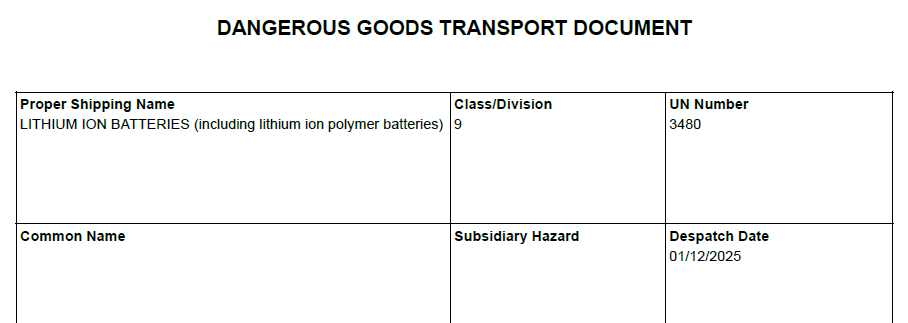
Download Dangerous Goods PDF here.
Important: One DG document is produced per consignment. When multiple items on a consignment contain dangerous goods, their details are aggregated and totalled on the same document.
Dangerous Goods Details
| Field | Description |
|---|---|
| Proper Shipping Name | Official UN shipping name for the dangerous good, with optional technical/chemical group names in parentheses |
| Class/Division | DG classification number (e.g., 3, 8, 9) |
| UN Number | United Nations identification number (e.g., UN1263) |
| Common Name | Technical or chemical group names |
| Subsidiary Hazard | Additional hazard classes if applicable, shown as slash-separated list (e.g., “3/8”) |
| Despatch Date | Date the consignment is scheduled for pickup/despatch |
| Container Type | Type of packaging used (e.g., carton, drum, pallet) |
| Packing Group | Packaging group indicating danger level (I, II, III) |
| Marine Pollutant | Indicates if substance is harmful to marine environment (Y/N) |
Aggregated Quantities
These fields show totals across all DG items in the consignment:
| Field | Description |
|---|---|
| Consignment Number | Carrier’s unique consignment identifier |
| Aggregate Quantity | Total quantity of dangerous goods (e.g., “50 L” or “25 kg”) |
| # Containers | Total number of containers/packages containing dangerous goods |
Consignor (Sender) Information
| Field | Description |
|---|---|
| Consignor’s Name | Sender’s business or contact name |
| Address | Sender’s street address (lines 1 and 2) |
| Suburb | Sender’s suburb, postcode, and state |
| Emergency Contact Number | 24-hour emergency contact phone number for dangerous goods incidents |
Receiver Information
| Field | Description |
|---|---|
| Receiver’s Name | Recipient’s business or contact name |
| Address | Recipient’s street address (lines 1 and 2) |
| Suburb | Recipient’s suburb, postcode, and state |
| Receiver’s Phone Number | Recipient’s contact phone number |
New Zealand Specific Declaration
For consignments originating from New Zealand, additional declaration fields appear at the bottom:
Document Layout Notes
- The DG document is generated at the consignment level, not per item
- When a consignment contains multiple DG items, quantities and container counts are summed
MO41 Multimodal Dangerous Goods Form
The MO41 form is a specialized A4 document for dangerous goods shipments that combines both a shipper’s declaration and a container/vehicle packing certificate. This document meets SOLAS 74 Chapter VII regulation 5 and MARPOL 73/78 Annex III regulation 4 requirements.
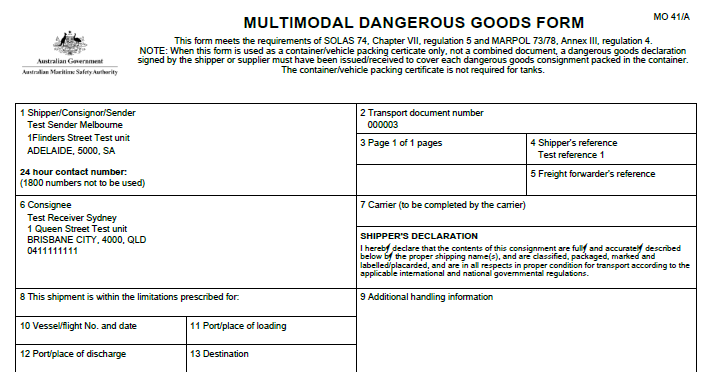
Key Characteristic: One MO41 form is generated per consignment containing dangerous goods. The form lists each individual DG item (not aggregated) and includes declaration sections for both the shipper and the person responsible for packing.
Form Header Information
| Field | Description |
|---|---|
| Transport Document Number | Carrier’s consignment identifier for tracking |
| Page Number | Current page and total page count (e.g., “Page 1 of 2 pages”) |
| Shipper’s Reference | Customer reference number |
Shipper/Consignor/Sender Details
| Field | Description |
|---|---|
| Shipper Name | Sender’s business or contact name |
| Shipper Address | Full street address including address lines 1 and 2 |
| Shipper Locality | Suburb, postcode, and state |
| 24 Hour Contact Number | Emergency contact phone number for dangerous goods incidents (note: 1800 numbers not to be used) |
Consignee Details
| Field | Description |
|---|---|
| Consignee Name | Recipient’s business or contact name |
| Consignee Address | Full delivery street address including address lines 1 and 2 |
| Consignee Locality | Suburb, postcode, and state |
| Consignee Phone | Recipient’s contact phone number |
Transport Details
| Field | Description |
|---|---|
| Vessel/Flight No. and Date | Transport vehicle/vessel identifier and departure date |
| Port/Place of Loading | Origin location for the shipment |
| Port/Place of Discharge | Destination unloading location |
| Final Destination | Ultimate delivery destination if different from discharge location |
Dangerous Goods Item List
Each DG item in the consignment is listed individually with the following details:
| Column | Description |
|---|---|
| Shipping Marks | Item identifier or carrier item reference |
| Description of Goods | Comprehensive DG details including: • UN number (e.g., UN1263) • Proper Shipping Name (PSN) • Class and subsidiary classes • Packing Group (PG) • Number of containers and type • Flash point (if applicable) |
| Gross Mass (kg) | Total weight of the dangerous good item (2 decimal places) |
| Net Mass (kg) | Net weight excluding packaging |
| Cube (m³) | Volume of the item |
Container/Vehicle Identification
| Field | Description |
|---|---|
| Container Identification Number | Container or vehicle registration number |
| Seal Number(s) | Security seal numbers applied to container |
| Container/Vehicle Size & Type | Container specifications and type |
| Tare Mass (kg) | Empty weight of container/vehicle |
| Total Gross Mass (kg) | Combined weight including tare mass |
Container/Vehicle Packing Certificate
This section certifies that goods have been properly packed and loaded. It includes:
| Field | Description |
|---|---|
| Company Name | Name of company responsible for packing |
| Name/Status of Declarant | Name and position of person certifying the packing |
| Place and Date | Location and date of packing certification |
| Signature of Declarant | Signature field for the person certifying |
Receiving Organization Receipt
For documenting receipt of the dangerous goods shipment:
| Field | Description |
|---|---|
| Haulier’s Name | Name of transport company |
| Vehicle Registration No. | Vehicle registration used for transport |
| Signature and Date | Signature and date of receipt by haulier |
| Driver’s Signature | Signature of driver collecting the shipment |
| Company Name | Name of shipper preparing the document |
| Name/Status of Declarant | Name and position of shipper’s representative |
| Place and Date | Location and date of handover |
| Signature of Declarant | Shipper’s signature confirming handover |
Shipper’s Declaration
The form includes a declaration stating that:
- Contents are fully and accurately described using proper shipping names
- Goods are classified, packaged, marked, labelled, and placarded correctly
- Shipment is in proper condition for transport according to applicable regulations
Important Notes Section
The form includes regulatory notes about:
- Dangerous goods mandatory requirements (proper shipping name, hazard class, UN number, packing group, marine pollutant status)
- References to IMDG Code sections 5.4.1.1 and 5.4.2
- Clarification that when used as a container packing certificate only (not combined document), a separate dangerous goods declaration signed by shipper/supplier must exist for each DG consignment
Document Layout
- Standard A4 portrait format
- Multiple pages may be generated if many DG items are present
Support
For integration assistance, contact MachShip carrier support via our carrier integrations form here.